
LATEST RELEASE
Analytics Release 2.9.1
Release Date: 21 March 2025
SBMS Warehouse and Analytics - Features
Spot Comments Dimension
|
Client Group Dimension
|
SBMS Warehouse and Analytics - Fixes
|
What is it? Updated logic for Analytics Reports to ensure accurate Media Billing Cleared and Uncleared Costs, aligning them with SBMS data. |
|
What is it? Updated logic to correct Commitment records that were incorrectly flagged as Network instead of Spot. |
|
What is it? Updated logic for Analytics Reports to to ensure accurate Vendor Costs, aligning them with SBMS data. |
|
What is it? Updated Filter By Date logic to correctly apply selected filters when 'Is in the year...' is selected. |
Analytics Release 2.9
Release Date: 17 January 2025
SBMS Warehouse and Analytics - Features and Fixes
-
Updated logic to correctly return unmatched Spot Log records in Analytics.
-
Enhanced logic to return Order Details Program Name regardless of whether the Spot Log status is matched or unmatched.
-
Added support to post reports on Spot and Network Logs.
-
Introduced an 'Is Log' dimension to identify posts generated from Logs versus Invoices.
-
Implemented performance improvements for loading the data into Dimension & Fact tables.
Analytics Release 2.8
Release Date: 05 November 2024
SBMS Warehouse and Analytics - Features and Fixes
-
Vendor Tax: Added new Vendor Tax dimensions under Vendor group to support Vendor details in SBMS. The following dimensions are available for reporting across all modules, Spot, Network, Print, Outdoor and Digital.
DIMENSIONS- Tax Type
- Start Date
- End Date
- Tax %
- Base Tax On
- Vendor Frequency: Added a new Frequency dimension under Vendor and Frozen Vendor category to support reporting on Print Vendor frequency in Snowflake and Analytics. The field supports the Frequency value in the SBMS Publication Information screen for the Print module.
- Media: Updated Media dimension from Media | Media to Media | Vendor Media to clearly distinguish between Vendor Media and Estimate Media. Previously, Media dimension did not specifically define which Media was being reported, Estimate or Vendor.
- SOV%: Added SOV% dimension to Order Details | Digital Placement and Frozen Order Details | Digital Placement in SBMS warehouse and Analytics to support the SOV% in the SBMS source database. In SBMS, the field can be found in the Digital Media Plan screen.
Analytics Release 2.7
Release Date: 20 September 2024
SBMS Warehouse and Analytics - Features and Fixes
-
Pre-Pay Data: Starting in v2.7 added new Measures and Dimensions to support Pre-Pay (CIA) data when enabled in SBMS. The data is sourced from SBMS database tables and visible in Pre-Pay and Cash-in-Advance Reconciliation screens across all SBMS modules. Additionally, updated procedures to support SBMS Data Checks and alerts for new Pre-Pay data fields.MEASURES
- Pre-Pay Invoice Gross Cost
- Pre-Pay Invoice Net Cost
- Pre-Pay Invoice TaxDIMENSIONS
- Pre-Pay Invoice Month
- Pre-Pay Invoice Number
-
Starting in v2.7, added new Vendor Dimensions to the Master Data - Vendor Report. Media ID, Vendor ID, and Inactive Vendor fields can be added to the Master Data - Vendor Report for comprehensive reporting. The fields are not visible in the Analytics explore panel.DIMENSIONS
- Media ID
- Vendor ID
- Inactive
- Updated logic to correctly return Media Billing Costs to match AdHoc reports when exporting data results to Excel. Previously, when exporting results to Excel, some records could appear as duplicate rows.
- Updated logic to expose the Media Billing Details Billing Month filter in order to correctly return Media Billing Cost Totals that match AdHoc reports. Previously, the 'Total Billed and Unbilled Client Net with Fees' could return inconsistent values between SBMS Warehouse/Analytics and AdHoc cubes.
- Updated logic to correctly return data when 'Log Details' are included in Analytics reports. Previously, including 'Log Detail' fields in some Analytics reports could return 'No Results'.
Analytics Release 2.6
Release Date: 02 August 2024
SBMS Warehouse and Analytics - Features and Fixes
-
Starting in v2.6, new Commitment fields are available for reporting in Analytics to support the new Commitment screen in the SBMS application. New dimensions and measures enhance the ability to track and manage client commitments effectively with Analytics.
DIMENSIONS
- Commitment ID: Unique identifier for each commitment.
- Commitment Budget Type: Classification of the commitment based on its budget type.
- Commitment Name: The name assigned to the commitment.
- Commitment Type: The category of the commitment.
- Start Date: The date when the commitment begins.
- End Date: The date when the commitment ends.
MEASURES
- Budget: The financial allocation for the commitment.
- Starting in v2.6, a new Estimate Media dimension is available under Media category to support Estimate Media field in SBMS. Specifically, Spot Estimates in SBMS can have an Estimate Media that differs from the Vendor Media within the Estimate. For example, an Estimate can have a TV media type and include Cable, TV, and/or Digital Video Vendor Media types.
- Updated logic to return correct Purchased Cost when insertion lines include Placement Flights for Digital Estimates. Previously, Placement Flights were not considered in the vendor cost line and Client Totals could differ from source data in SBMS screens.
- Updated logic to account for Payment Reference updates during incremental loads. Previously, changes made to Payment Reference data after a full load would not be reflected in Snowflake or Analytics.
Analytics Release 2.5
Release Date: 17 May 2024
SBMS Warehouse and Analytics - Features and Fixes
- Added Direct Pay dimension under Media Billing Details to support the Direct Pay check box in SBMS, Media Billing - Client Billing Setup. Analytics returns Y or N to indicate if Direct Pay in SBMS is checked or unchecked respectively. Estimates not loaded in Data Warehouse return null values.
- Added Access Code dimension under Order Details and Frozen Order Details to support Access Code from SBMS Scheduling screens.
- Added support for Barter Credits. A new Media Billing Barter Credit category was added with the following dimensions and measures.
Barter Credit Percent
- Updated logic to correctly return Alternate Bill Code value for Print and Outdoor estimates. Previously, Print and Outdoor estimates would return blank Alternate Bill Code even when SBMS showed a value.
- Updated Analytics logic to hide Invoice Ids for Not Received invoices to match the SBMS UI. Previously, Analytics would return Invoice Ids for Not Received invoices based on database records that SBMS would not display in UI.
- Updated logic to correctly return Post Details when records are deleted in SBMS. Previously, Analytics could return duplicate records after Post records were deleted from SBMS.
- Updated logic to correctly return Log Detail records when Purchased UnEqv. Imps and/or Purchased UnEqv. Imps (000) are included in the report. Previously, Analytics would return 'No Results' when the report included Purchased UnEqv. Imps or Purchased UnEqv. Imps (000).
- Updated logic to filter out records with zero Spots/Units for the following SecureViews:
- Updated logic to correctly return Client Net % to match SBMS UI. Previously, Analytics would return the calculated Client Net % that might not match the SBMS Scheduling screens.
Analytics Release 2.4
Release Date: 14 March 2024
SBMS Warehouse and Analytics - Features and Fixes
- Added logic to support Traffic Status and Traffic Status Date for Network Estimates. Previously, the fields would only return data for Spot Estimates.
- Updated logic to support Vendor Media. Starting in v2.3, Media will return Vendor Media instead of Estimate Media for Spot and Network estimates. Saved and scheduled reports will update accordingly. Previously, starting in v2.2, Media would return Estimate Media. This difference will impact saved and scheduled reports.
- Updated logic to correctly return Log data after Logs were deleted from the source database. Previously, Analytics could return an error, 'Non-unique value/primary key (or sql_distinct_key), value overflow or collision when computing sum.'
- Updated logic to support ISCI by Unit workflow for Network Estimates. Previously, Analytics would not return Traffic Details for estimates with ISCI by unit.
- Updated logic for reports with Media to return Estimate Media instead of NULL for Digital Fee Vendors.
- Updated logic to correctly return Goal Cost when Demo Order is included in the report. Previously, Goal Cost records could be duplicated when Demo Order was a field in the report.
- Updated logic to populate Adazzle Actualized column during full load. Previously, the column was only updated after incremental loads
- Updated logic to correctly map ModuleIDs between SBMS and Sbmswarehouse. Previously, incorrect mappings could return inconsistent Maven vendor data.
- Updated Media Billing logic to support the latest SBMS changes in v24.4.
- Updated Analytics logic to match SBMS UI and filter out 'Survey Book Not Available' when applicable. Previously, 'Survey Book Not Available' was not filtered out in Analytics and could return a record when SBMS UI did not.
Analytics Release 2.3
Release Date: 07 February 2024
SBMS Warehouse and Analytics - Features and Fixes
- Added Traffic Status and Traffic Status Date dimensions under Traffic Details in Analytics. The fields align with Traffic Status and Traffic Status Date fields in SBMS Schedule Status screen for Spot and Network modules.
- Added Unit Day dimension to Order Details to support Unit Day column in SBMS Network module.
- Added Maven logic for cable Networks and exposed Maven fields in Analytics UI.
- Updated 'Adazzle Actualized' logic to return 'Actualized', 'Partial', or NULL in Analytics to match SBMS's 'External Actualized' field. Previously. 'Actualized' and 'Partial' values in SBMS would return 'Yes' in Analytics and NULL values in SBMS would return 'No' in Analytics.
- Updated SBMS Warehouse logic to match AdHoc and correctly return Spot and Network Log data when including Order Details such as Program Name in the report. Previously, when including Order Details Program Name in the report, Logs would return all ordered data regardless of Log details.
- Updated SBMS Warehouse logic to correctly return Spot and Network Log data when including Broadcast week in the report. Previously, when including Broadcast week, Logs would return all ordered data regardless of Log details.
- Updated PAYEECONTACTNAME and PAYEENAME columns in MASTERDIMENSION.VENDOR table to support varchar(100) to match SBMS database fields. Additionally, updated PAYEENAME column in MASTERDIMENSION.VENDORFROZEN table to support varchar(100) to match SBMS database fields.
PAST RELEASES
Analytics Release 2.2
Release Date: 14 November 2023
SBMS Warehouse and Analytics - Features
Analytics Report Templates
Starting November 2023, SBMS Analytics users will have the ability to navigate to shared analytics reports folder with report templates that have pre-set filters and fields.
Templates offer users:
- Time savings with reusable fields and filters.
- Enhanced accuracy, reducing data errors.
- Streamlined look and feel.
- Customization for specific needs.
Access analytics report templates in SBMS Reports by navigating to the analytics module, clicking on the folder icon, and selecting "Shared" "Analytics Report Templates."
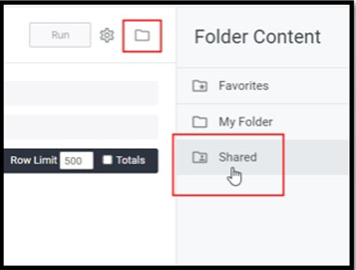
For more information, please see the SBMS Analytics Report Templates article in the Strata Knowledge Base.
SBMS Warehouse and Analytics - Fixes
- This release contains additional fixes found as part of data checks.
- Added logic to support Log deletions. Previously, when a log record was deleted in SBMS, Analytics would return some deleted Log details.
- Added additional OrderDetailKey column in the Fact EstimateDemo and EstimateDemoFrozen tables.
- Updated logic to prevent data inconsistencies while the incremental load process is running. Previously, when the incremental load process coincided with a report generated at the same time, the report could return inconsistent data.
Analytics Release 2.1.2
Release Date: 10 October 2023
SBMS Warehouse and Analytics - Features
- Added Invoice Notes dimension in Invoice Details category. The field exposes SBMS data from Spot Invoice Notes, Network Invoice Notes, Print/OOH Invoice Comments, and Digital Invoice Comments.
- Added Calendar Week Start Date dimension under Date category.
- Added Purchased Eqv. Units measure under Costs category.
- Added Demo Purchased CPM measures under Demo Impressions to support non-primary demo CPM data.
- Updated Calendar Month to Calendar Month Number.
- Updated Broadcast Month to Broadcast Month Name.
- Updated Calendar Month Name to sort by Month instead of Alpha order.
SBMS Warehouse and Analytics - Fixes
- Updated Purchased Cost logic to only display under Purchased Cost and null value for Fee Amount. Previously, Purchased Cost would duplicate the same value for both Fee Amount and Purchased measures (Gross/Net).
- Updated logic to avoid Invoice Net discrepancies when updates are made to revised invoices for Digital Estimates.
- Updated Network Post logic in SBMS Warehouse to always pull all post records regardless of Network table updates.
- Updated Network Post logic to so that all post vendor records return.
- Updated logic for Fee Vendors to return correct Estimate Media in Analytics. Previously, some Fee Vendors could return Media = NULL.
- Updated logic to correctly return 12:00 Invoice Unit Time. Previously, Analytics and SBMS Warehouse would return NULL for 12:00 times.
- Updated logic to correctly return Digital Placement Material Comments. Previously, Material Comments would incorrectly return NULL results for Digital Estimates.
- Updated incremental load logic to prevent Goal data discrepancies.
Analytics Release 2.1.1
Release Date: 15 July 2023
SBMS Warehouse and Analytics - Features
Added Store# and Zone dimensions under Order Details/ Print/OOH. Store # populates from SBMS Outdoor module estimates, Zone populates from SBMS Print module estimates.
Added Avail ID dimension to Order Details and Frozen Order Details sections of Analytics to support Avail ID from SBMS. Data populates for Spot Estimates only.
Added Category, File Size and Material Due Date dimensions under Order Details/Digital Placement and Frozen Order Details/Digital Placement to support the same fields in SBMS Media Plans. The fields populate for Digital estimates only.
Analytics - Fixes
Fixed incremental load logic to correctly update AdServer data when changes are saved in SBMS. Previously, changes to Adserver data in SBMS could cause data differences in SBMS Warehouse and Analytics.
Updated logic to only return Posts with 'Final' Post Status. Previously, Posts with Active and Final Status would return.
Updated incremental load logic to correctly return Print Invoice Header data, including Print and Outdoor Tax when changes are made in SBMS. Previously, when updates were made to the Print Invoice Header table, the changes were not applied in SBMS Warehouse and Analytics.
Updated logic to correctly return Print Payee Contact information to match source, SBMS. Previously, SBMS data was not returned in Analytics.
Updated Calendar Month Name to always show complete Month. Previously, Analytics could return abbreviated month Jan instead of January.
Updated logic to match SBMS and give all users access to newly added Clients when Client-Level Security is not enabled. Previously, Analytics users incorrectly did not have access to new client(s) data .
Updated Fee Vendor logic to only display Fee Costs under Fee Amount ; Purchased Gross and Purchased Net fields will display '0'. Previously, Fee Costs would duplicate the same value in Fee Amount and Purchased measure fields (Gross/Net).
Updated logic to correctly display status 'Not Received' instead of 'NULL' for all modules. Starting in v2.1, 'Not Received' status returned null values instead of the 'Not Received' status expected.
Analytics Release 2.1
Release Date: 1 May 2023
SBMS Warehouse and Analytics - Features
Updated Date fields to specify 'Calendar’ where appropriate.
Analytics - Fixes
Updated logic to correctly display Invoiced Tax for Spot estimates.
Analytics Release 2.0
Release Date: 12 August 2022
Feature Highlights
Addition of Digital Campaign Budget
Analytics Release 1.51
Release Date: 20 June 2022
Feature Highlights
Addition of Network Traffic Data
New Dimensions and Measures for Network Traffic Details in Analytics and updated existing Spot Traffic Dimensions for clarity. Data originates from SBMS sTraffic Instructions screen.
Addition of Frozen Network Unit Number
Added Network Unit Number under Frozen Order Details to support Frozen Order Detail reporting in Analytics.
Fixes
Updated logic so selected filter such as 'Broadcast Quarter Name' take precedence over default 'Filter By Date'.
Fixed a syntax error when including Traffic Details Start Time and Traffic Details End Time in Analytics Reports.
Analytics Release 1.5
Release Date: 22 May 2022
Feature Highlights
Addition of Audit Log data
New Dimensions for Audit Logs added to support Audit details in Analytics. Module-Level security applies to the fields.
Addition to Order Details
Added Unit Number under Order Details/Network Dimensions. Unit Number applies to Network Estimates and aligns with Unit # in SBMS Schedule Unit View.
Added Digital Media Group to Order Detail Dimensions in Analytics.
Fixes
Fixed logic for Additional Demo Impressions. Previously, incorrect demo impressions could return if the order included unmatched invoice records.
Analytics Release 1.4
Release Date: 28 March2022
Feature Highlights
Addition of Print/OOH Barter data
New Measures and Dimensions for Barter Details have been added to support Barter Costs in Analytics. The fields apply to agencies with Print Barter enabled in SBMS.
Addition of SBMS Budget/Goal data
New Measures and Dimensions for Goals in have been added to Analytics. These Goals apply to Spot and Network Estimates.
Addition of Spot and Network Log data
New Measures and Dimensions for Log Details in Analytics have been applied. The Log Details apply to Spot and Network Estimates.
Addition of Additional Demos
New Measures for additional, non-primary demos under Costs category have been added in Analytics. Additional Demos apply to Spot and Network estimates.
Addition of Network Unit Cost
New Dimensions for Purchased Unit Cost and Frozen Purchased Unit Cost under Order Details/Network and Frozen Order Details/Network to support Unit level cost in Analytics.
Analytics Release 1.3
Release Date: 12 February 2022
Feature Highlights
Addition of Agency Defined Fields
New Dimensions for Client Custom Fields, Product Custom Fields and Estimate Custom Fields have been added to the Data Warehouse. Each category includes Custom Field Name 1-10 and Custom Field Value 1-10. Data originates from SBMS Agency Defined Fields.
Addition of SBMS Maven Data
MAVEN fields have been added to Analytics to support MAVEN data.
NOTE: The fields are hidden in v1.3 for all agencies.
Addition of SBMS Media Billing Module Data
Logic has been updated to hide Media Billing categories when the agency does not have access to Media Billing in SBMS.
Addition of Spot Traffic Data
Additional Dimensions and Measures have been added to the Data Warehouse for Spot Traffic Details. The data for Traffic Details originates from SBMS Assign Traffic screen.
Analytics and Data Warehouse Support
The Eyes on Imps (EOI) Dimension has been added under Order Details category for Print/OOH. The values originate from (EOI) Eyes on Imps column in SBMS Outdoor Scheduling screen. Additional Measures have also been added for Rtg and CPP. The RTG and CPP measures can contain values up to two decimals. Rtg and CPP Measures apply Spot and Network Estimates. Measures have also been added for GRP, up to two decimals. The GRP measures apply to Spot and Network Estimates.
More Information
For more detailed information about Analytics, please see:
0 Comments